
Using XSL Formatting Objects, Part 2
January 24, 2001
| Table of Contents |
|
•Part one of this
series |
This article is the second part of our series on using XSL Formatting Objects. You should read the first article before proceeding with this one.
Having tackled the cover and contents page in the previous article, we're now ready to put the main content into the Spanish handbook. Let's start off with:
|
The headings and paragraph will be <fo:block> elements, and the bold and underlined words will be <fo:inline> elements. Let's start with a description of the first heading.
<fo:block
    font-size="14pt" font-family="sans-serif"
    font-weight="bold" color="green"
    space-before="6pt" space-after="6pt">
        Introduction
<fo:block>
the space-before and space-after are two of the many properties that you may set for a block. Many of them are exactly the same as the properties you can use in Cascading Style Sheets (CSS)
- Font Properties
- font-family, font-weight, font-style (italic), font-size, font-stretch, font-variant (small-caps)
- Background Properties
- background-color, background-image, background-repeat, background-attachment (scroll or fixed)
- Border Properties
-
border-location-info where:
location is one of before, after, start, end, top, bottom, left, or right
info is one of style, width, or color - Padding Properties
-
padding-location where:
location is one of before, after, start, end, top, bottom, left, or right - Margin Properties
-
margin-location where:
location is one of top, bottom, left, or right - Text Alignment Properties
- text-align and text-align-last (for last line of text in block ); values can be start, end, left, right, or center
- Indentation Properties
- text-indent (first line), start-indent, end-indent
- Miscellaneous Properties
- wrap-option (no-wrap or wrap); widows and orphans (determining how many lines must be left at top or bottom of a page) break-after and break-before (when to do page or column breaks); reference-orientation (rotated text in 90-degree increments)
Given the plethora of options, we can have a fairly complicated block definition for the paragraph. The definition below uses the dot-notation “compound datatype” to allow the page layout mechanism some flexibility in paragraph spacing:
<fo:block
    text-indent="1em"
    font-family="sans-serif" font-size="12pt"
    space-before.minimum="2pt"
    space-before.maximum="6pt"
    space-before.optimum="4pt"
    space-after.minimum="2pt"
    space-after.maximum="6pt"
    space-after.optimum="4pt">
This handbook covers the major topics in Spanish, but is by
no means complete.
<fo:block>
If your document has twenty or thirty headings and seventy or eighty paragraphs, you don't want to type (or copy and paste) all of these Formatting Objects elements. This is where XSLT comes in. We will write our document in HTML and then use an XSLT to transform it to the far more verbose XSL:FO version. Here's the HTML so far:
<h3>Introduction</h3>
<p>
This handbook covers the major topics in Spanish, but is by
no means complete.
</p>
<h3>Accents</h3>
<p>
When we pronounce English words, one syllable is usually
emphasized (<b>stressed</b>, in linguistic terms).
The stressed syllable is underlined in the following
words: com<u>pu</u>ter, <u>lan</u>guage, de<u>vel</u>opment,
suc<u>ceeds</u>. Spanish
words also have a stressed syllable, and there are rules for
determining which syllable carries the emphasis.
</p>
And here are the templates you'll need to do the headings and paragraphs:
<xsl:template match="h3">
    <fo:block font-size="14pt" font-family="sans-serif"
        font-weight="bold" color="green"
        space-before="6pt" space-after="6pt">
    <xsl:apply-templates/>
    </fo:block>
</xsl:template>

<xsl:template match="p">
    <fo:block
        text-indent="1em"
        font-family="sans-serif" font-size="12pt"
        space-before.minimum="2pt"
        space-before.maximum="6pt"
        space-before.optimum="4pt"
        space-after.minimum="2pt"
        space-after.maximum="6pt"
        space-after.optimum="4pt">
    <xsl:apply-templates/>
    </fo:block>
</xsl:template>
What happens to all of the page-initialization code from the past article? It goes into templates that handle the <html> and <body> tags. We won't repeat it here, but you can peruse it in another browser window.
That leaves the <b> and <u> tags. Those are inline elements handled via <fo:inline> (with <i> thrown in as a bonus).
<xsl:template match="b">
    <fo:inline font-weight="bold"><xsl:apply-templates/></fo:inline>
</xsl:template>

<xsl:template match="u">
    <fo:inline text-decoration="underline"><xsl:apply-templates/></fo:inline>
</xsl:template>

<xsl:template match="i">
    <fo:inline font-style="italic"><xsl:apply-templates/></fo:inline>
</xsl:template>
Once we set up the HTML file and run it through XSLT and FOP, we come up with:

Lists
Next, we will add lists to the document. Here's the content to be added:
|
Four elements are used to set up a list. An <fo:list-block> contains individual <fo:list-items>. Each list item is composed of a <fo:list-item-label> and a <fo:list-item-body>. You set the spacing by setting the attributes shown in the diagram below:
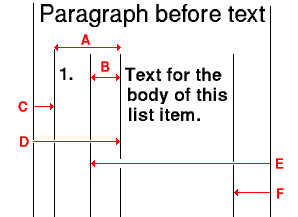
- provisional-distance-between-starts
- provisional-label-separation
- start-indent for list-item-label
- start-indent for list-item-body
- end-indent for list-item-label
- end-indent for list-item-body
Now we can create an XSLT template to handle an ordered list. We'll set the start indent of the list item label, and leave the rest up to FOP. By using the relative em spacing, lists will give reasonable spacing with any size font.
<xsl:template match="ol">
    <fo:list-block
      space-before="0.25em" space-after="0.25em">
        <xsl:apply-templates/>
    </fo:list-block>
</xsl:template>

<xsl:template match="ol/li">
    <fo:list-item space-after="0.5ex">
        <fo:list-item-label start-indent="1em">
            <fo:block>
                <xsl:number/>.
            </fo:block>
        </fo:list-item-label>
        <fo:list-item-body>
            <fo:block>
                <xsl:apply-templates/>
            </fo:block>
        </fo:list-item-body>
    </fo:list-item>
</xsl:template>
Unordered lists are set up similarly except that you use a bullet instead of a number. The relevant part of the definition for list items in an unordered list is
<xsl:template match="ul/li">
<fo:list-item>
<fo:list-item-label start-indent="1em">
<fo:block>
•
</fo:block>
<!-- etc. -->
Definition Lists
Using the list model to create a definition list where the terms and their definitions share the line space requires incredibly complex XSLT. (You can see it in the XSL specification, section 6.8.1.1.) Instead, we'll put the terms and definitions on separate lines, as HTML is ordinarily rendered.
<xsl:template match="dl">
    <fo:block space-before="0.25em" space-after="0.25em">
        <xsl:apply-templates/>
    </fo:block>
</xsl:template>

<xsl:template match="dt">
    <fo:block><xsl:apply-templates/></fo:block>
</xsl:template>

<xsl:template match="dd">
    <fo:block start-indent="2em">
    <xsl:apply-templates/>
    </fo:block>
</xsl:template>
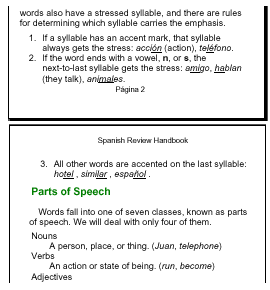
Here's a portion of the booklet, showing an ordered list and a definition list. Note that the text flows from one page to the next without our having to do anything special.
Tables
When we get to verbs, we'll have to show the classical conjugation table below.
| Singular | Plural |
|---|---|
| yo canto | nosotros cantamos |
| tú cantas | vosotros cantáis |
| él canta ella canta |
ellos cantan ellas cantan |
An XSL Formatting Objects Table has elements in this hierarchy
<fo:table-and-caption>
   <fo:table-caption>
   <fo:table>
      <fo:table-column>
      <fo:table-header>
         <fo:table-row>
            <fo:table-cell>
      <fo:table-body>
         <fo:table-row>
            <fo:table-cell>
      <fo:table-footer>
         <fo:table-row>
            <fo:table-cell>
The <fo:table> corresponds to the HTML <table> tag; <fo:table-body> corresponds to <tbody>. The only addition of note is the <fo:table-column> specifier, which allows you to specify how wide each column in your table will be. You can use this tag to specify characteristics of cells that have the same column and span. In the current (January 2001) implementation of FOP, the <table-and-caption> element is not implemented. You are required to specify column widths with the column-width attribute in the <fo:table-column> element. FOP does not automatically figure out how wide your table is.
The following XSLT is written for simple tables, and it assumes all column widths are specified in the first table row, and that all widths are in pixels. It also assumes that there are 72 pixels per inch. It doesn't handle column or row spans. Take a deep breath, though, as it's still fairly lengthy.
<!-- when table-and-caption is supported, that will be the
   wrapper for this template -->
<xsl:template match="table">
    <xsl:apply-templates/>
</xsl:template>

<!--
    find the width= attribute of all the <th> and <td>
    elements in the first <tr> of this table. They are
    in pixels, so divide by 72 to get inches
-->
<xsl:template match="tbody">
<fo:table>
    <xsl:for-each select="tr[1]/th|tr[1]/td">
        <fo:table-column>
        <xsl:attribute name="column-width"><xsl:value-of
                select="floor(@width div 72)"/>in</xsl:attribute>
        </fo:table-column>
    </xsl:for-each>

<fo:table-body>
    <xsl:apply-templates />
</fo:table-body>

</fo:table>
</xsl:template>

<!-- this one's easy; <tr> corresponds to <fo:table-row> -->
<xsl:template match="tr">
<fo:table-row> <xsl:apply-templates/> </fo:table-row>
</xsl:template>

<!--
    Handle table header cells. They should be bold
    and centered by default. Look back at the containing
    <table> tag to see if a border width was specified.
-->
<xsl:template match="th">
<fo:table-cell font-weight="bold" text-align="center">
    <xsl:if test="ancestor::table[1]/@border > 0">
        <xsl:attribute name="border-style">solid</xsl:attribute>
        <xsl:attribute name="border-width">1pt</xsl:attribute>
    </xsl:if>
    <fo:block>
    <xsl:apply-templates/>
    </fo:block>
</fo:table-cell>
</xsl:template>

<!--
    Handle table data cells.  Look back at the containing
    <table> tag to see if a border width was specified.
-->
<xsl:template match="td">
<fo:table-cell>
    <xsl:if test="ancestor::table/@border > 0">
        <xsl:attribute name="border-style">solid</xsl:attribute>
        <xsl:attribute name="border-width">1pt</xsl:attribute>
    </xsl:if>
    <fo:block>
    <!-- set alignment to match that of <td> tag -->
    <xsl:choose>
    <xsl:when test="@align='left'">
        <xsl:attribute name="text-align">start</xsl:attribute>
    </xsl:when>
    <xsl:when test="@align='center'">
        <xsl:attribute name="text-align">center</xsl:attribute>
    </xsl:when>
    <xsl:when test="@align='right'">
        <xsl:attribute name="text-align">end</xsl:attribute>
    </xsl:when>
    </xsl:choose>
    <xsl:apply-templates/>
    </fo:block>
</fo:table-cell>
</xsl:template>
The third person entries require a <br /> tag, which is translated into FO this way:
<xsl:template match="br">
<fo:block><xsl:text>
</xsl:text></fo:block>
</xsl:template>
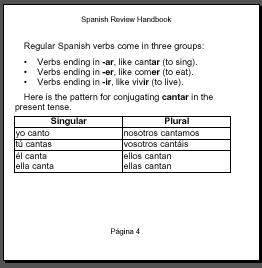
And the resulting table looks like
Summary
As you have seen, the combination of XSLT and FO allows you to convert your XHTML or other XML documents to a format designed for print. These articles only begin to cover the layout possibilities that XSL Formatting Objects give you. For more information about XSL:FO, see Elliotte Rusty Harold's XML Bible, Chapter 15.
You can get all the files (ZIP or TGZ) used in these articles, including an XSL file that handles more aspects of converting HTML to FO, and that was used to convert these articles to PDF format.